The right plotter printer can help a small business produce CAD plans, posters, technical drawings, signage, and marketing materials in-house. The best choice depends on more than maximum paper width: workflow, media handling, print quality, operating costs, and support all matter.
We’ve gathered 10 wide-format printers and vinyl cutter plotters covering compact 24-inch models, broader 36-inch machines, multifunction options, and sign-making bundles. Use the guide below to narrow the list according to your business’s everyday workload and budget.
Best 10 Plotter Printers for Small Businesses Picks for 2026
Best Overall for CAD
HP DesignJet T210 24-Inch Plotter

- 24-inch roll support with automatic cutter
- Precise CAD lines and crisp text
- HP Click software simplifies job setup
Best For: CAD drawings, maps, posters, and sewing patterns
Best for Home Sign Shops
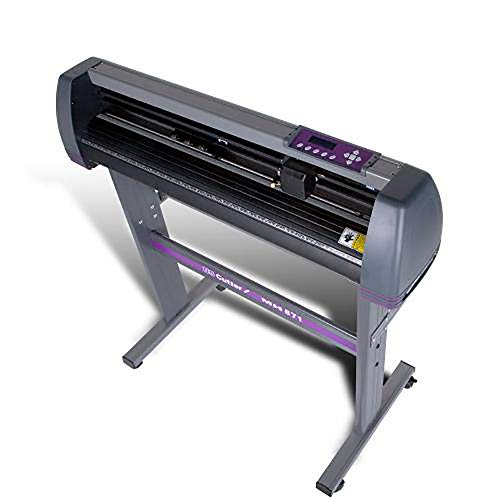
- 30-inch cutting width for signs and decals
- Includes stand and VinylMaster Cut software
- Lifetime US-based phone support
Best For: Home-based signage, decals, and apparel graphics
Best Multifunction Option

- 24-inch large-format printing
- Flatbed scanner for enlargements and copies
- Cloud, Wi-Fi, Ethernet, and USB support
Best For: Mixed printing, scanning, copying, and office workflows
Best Budget Vinyl Cutter

- Cuts material up to 30.7 inches wide
- Adjustable speed and pressure controls
- USB and common vector-format support
Best For: Vinyl signs, labels, crafts, and heat-transfer work
Best for Durable Color Output

- 24-inch wide-format printing
- Water- and UV-resistant color ink
- Sharp lines with 2400 x 1200 dpi
Best For: Construction documents, posters, and outdoor signage
Best for Easy CAD Workflows
- 24-inch roll printing for CAD and posters
- HP Click software reduces setup errors
- Includes 2-year onsite support
Best For: Small architecture, engineering, and construction offices
Best for High-Width CAD and Maps

- Prints on media up to 36 inches wide
- Includes stand, feeder, and media bin
- Automatic sheet/roll switching
Best For: Wide CAD drawings, maps, posters, and signage
Best for High-Volume Wide-Format Work
HP DesignJet T650 36-Inch Plotter

- Supports rolls up to 36 inches wide
- Automatic sheet/roll switching and cutting
- Includes 2-year onsite HP support
Best For: Architecture, engineering, and construction offices needing precise 36-inch output
Best Heavy-Duty Pick
HP DesignJet T830 24-Inch MFP Plotter
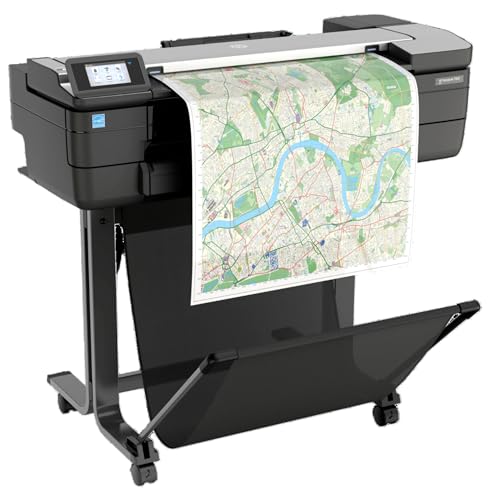
- Prints, scans, and copies technical documents
- Supports 24-inch rolls and sheets
- Offers Wi-Fi and mobile printing
Best For: Architecture and construction offices needing compact multifunction output
Best Compact Choice
HP DesignJet T230 24-Inch Plotter

- Prints rolls up to 24 inches wide
- Compact 40-inch-wide design
- Includes 2-year HP onsite support
Best For: Small offices needing straightforward 24-inch technical and poster printing
Best Overall for CAD – HP DesignJet T210 24-Inch Plotter
HP DesignJet T210 Large Format 24-inch Plotter Printer, for Easy CAD & Poster Prints (8AG32D)
Check Price On AmazonFor small businesses comparing plotter printers for small businesses, the HP DesignJet T210 is a strong fit for precise technical documents and wide-format color work. It supports media rolls up to 24 inches wide, includes roll and sheet feeding, and offers practical workflow tools for multi-size projects.
Best For: CAD line drawings, maps, posters, renders, and professional sewing patterns.
Pros:
- Produces precise line work and crisp text at up to 2400 x 1200 dpi.
- Supports up to 24-inch rolls, with an optional feeder for sheets up to 13 x 19 inches.
- HP Click software provides PDF error checking, auto-nesting, and simple drag-and-drop printing.
- Offers Ethernet, USB, Wi-Fi, and remote management through the HP Smart app.
Cons:
- The optional automatic sheet feeder is not included.
- It uses HP 712 ink cartridges and an HP 713 printhead.
- At 47.4 pounds, it requires dedicated workspace.
The T210 is a versatile choice when accurate CAD output and straightforward large-format workflows matter more than compact size. Its included software and automatic cutter can also help reduce setup time and paper waste.
Best for Home Sign Shops – USCutter 34-Inch Vinyl Cutter
Businesses focused on decals, apparel, or signage may prefer a vinyl cutter over an inkjet plotter. This 34-inch USCutter includes a stand and VinylMaster Cut software, giving small businesses a practical way to bring basic graphics production in-house.
Best For: Signs, banners, decals, heat-transfer apparel, and home-based graphics businesses.
Pros:
- Feeds material up to 34 inches wide and cuts up to 30 inches wide.
- Three adjustable pinch rollers help accommodate different material setups.
- Adjustable cutting speed and pressure support varied vinyl projects.
- Includes vectorizing and cut software plus lifetime US-based phone support.
Cons:
- This is a vinyl cutter, not a color printer for printed CAD or poster output.
- Its software and Windows-based cutting workflow may require setup before production.
- The 47-pound unit and included stand need dedicated floor space.
Choose the USCutter when your business needs to cut adhesive vinyl or heat-transfer material rather than print wide-format images. The included software and technical support make it especially approachable for a new sign or apparel operation.
Best Multifunction Option – Canon imagePROGRAF TC-21M
The Canon imagePROGRAF TC-21M stands out among plotter printers for small businesses that need scanning and copying as well as large-format printing. Its flatbed scanner, cloud connectivity, USB flash drive port, and automatic sheet feeder make it useful for mixed office and production tasks.
Best For: Small offices that need large-format printing, enlargements, copying, scanning, and flexible paper handling.
Pros:
- Prints roll media up to 24 inches wide and supports sizes through A1.
- Flatbed scanning enables direct enlargements from smaller originals.
- Automatic sheet feeder holds up to 100 letter-size or 50 11 x 17-inch sheets.
- Supports cloud printing and scanning, Ethernet, Wi-Fi, and USB flash drive printing.
Cons:
- It uses simplex printing rather than automatic duplex output.
- The multifunction design may be more capability than a business needing print-only operation.
- Its listed maximum sheet capacity is 100 sheets.
The TC-21M is a practical pick for offices that want one machine to handle large-format output and document capture. Its scanner and connectivity options add flexibility for teams working with both physical originals and cloud files.
Best Budget Vinyl Cutter – VEVOR 34-Inch Vinyl Plotter
For businesses that primarily cut vinyl, labels, or heat-transfer designs, the VEVOR 34-inch machine offers broad material capacity and adjustable controls at a straightforward entry point. It is a cutter rather than a conventional inkjet plotter, with USB connectivity and support for common vector file formats.
Best For: Sign making, labels, decorations, crafts, and heat-transfer projects.
Pros:
- Accepts material up to 34.3 inches wide and cuts up to 30.7 inches wide.
- Adjustable pressure from 20 to 500 grams and speed from 20 to 800 mm per second.
- Double spring pinch rollers and a roughened steel roller support stable feeding.
- Supports USB, COMPIM, HP/GL, DM/PL, SVG, and PDF workflows.
Cons:
- It is designed for vinyl cutting, not full-color printing.
- The supplied notes list no warranty.
- Compatibility is specified for Windows computers through USB or COM connections.
The VEVOR is worth considering when cutting capacity and adjustable controls are the priority. Its broad format support suits small sign and craft operations, but buyers should confirm their computer and software workflow before ordering.
Best for Durable Color Output – Canon imagePROGRAF TM-240
For small businesses needing dependable wide-format output, the Canon imagePROGRAF TM-240 is a strong option among plotter printers for small businesses. Its 24-inch format, fast processing, and water-resistant ink support technical documents, signs, posters, and job-site materials.
Best For: Construction firms, print-focused offices, and businesses producing durable color drawings, posters, and signage.
Pros:
- Prints up to 24-inch-wide media with 2400 x 1200 dpi color resolution.
- Produces sharp lines and text using a 15,360-nozzle printhead and 5-picoliter droplets.
- Water- and UV-resistant ink can suit outdoor signs and construction-site documents.
- Supports Wi-Fi, Ethernet, and USB connectivity, plus color calibration.
Cons:
- Its 24-inch maximum width is smaller than a 36-inch plotter.
- At 88.2 pounds, it may require a dedicated, stable workspace.
The TM-240 is a practical fit when line clarity, color consistency, and resistance to outdoor conditions matter more than the largest possible media size. Automatic media detection also helps simplify routine operation.
Best for Easy CAD Workflows – HP DesignJet T210
The HP DesignJet T210 is a compact 24-inch choice for plotter printers for small businesses that regularly produce CAD drawings, blueprints, posters, or maps. Its roll and sheet handling, HP Click software, and included onsite support are designed to reduce setup friction.
Best For: Small architecture, engineering, construction, and design offices that need straightforward CAD and poster printing.
Pros:
- Handles rolls up to 24 inches wide and sheets up to 13 x 19 inches with the optional feeder.
- HP Click provides PDF error checking, alerts, auto-nesting, and drag-and-drop submission.
- Prints A1/D-size pages in as little as 45 seconds, with up to 59 prints per hour.
- Includes a 2-year HP Care Pack with onsite support.
Cons:
- The automatic sheet feeder is an optional accessory.
- It requires HP 712 and HP 713 cartridges for the stated optimal quality and longevity.
- It is limited to 24-inch-wide media.
The T210 emphasizes ease of use and workflow efficiency rather than maximum width. It is especially appealing for offices that want to send prepared files quickly from common applications or mobile devices.
Best for High-Width CAD and Maps – HP DesignJet T630
For small businesses that need more room for drawings, maps, or signage, the HP DesignJet T630 provides 36-inch-wide printing. It combines roll and sheet handling with an included stand, media bin, and automatic sheet feeder, making it one of the more complete plotter printers for small businesses with larger-format requirements.
Best For: Architecture, engineering, construction, GIS, and graphics businesses printing wide technical drawings, maps, posters, and signage.
Pros:
- Supports rolls up to 36 inches wide and sheets up to 13 x 19 inches.
- Includes an automatic sheet feeder, stand, media bin, and automatic sheet/roll switching.
- HP Click supports PDF checking, auto-nesting, and drag-and-drop job submission.
- Offers Ethernet, USB, and Wi-Fi connectivity for networked office workflows.
Cons:
- Its 123-pound weight and 52-inch width require substantial floor space.
- The included warranty is 1 year, shorter than the T210’s supplied coverage.
- It uses HP OEM 712 and 713 cartridges for the recommended print quality and longevity.
The T630 makes the most sense when 24-inch output is too restrictive and the business can accommodate a dedicated floor-standing printer. Its included media-handling accessories reduce the need for immediate add-ons.
Best for High-Volume Wide-Format Work – HP DesignJet T650 36-Inch Plotter
For small businesses handling architectural plans, engineering drawings, maps, and other large documents, the HP DesignJet T650 is a versatile choice among plotter printers for small businesses. It supports media rolls up to 36 inches wide, offers automatic sheet/roll switching, and includes HP Click software to help reduce setup time and paper waste.
Best For: Architecture, engineering, construction, and design offices that need precise line work and 36-inch large-format output.
Pros:
- Prints on rolls up to 36 inches wide and sheets up to 13 by 19 inches with the included feeder.
- Automatic sheet/roll switching and horizontal cutting simplify multi-size projects.
- Includes a 2-year onsite HP Care Pack and HP Click PDF checking, alerts, and auto-nesting.
- Supports Wi-Fi, Gigabit Ethernet, USB, HP-GL/2, and remote printing through HP Smart.
Cons:
- Its 52-inch-wide body requires substantial workspace.
- Optimal performance requires HP OEM 712 ink cartridges and a 713 printhead.
The T650 is a strong fit when a small business needs maximum width, dependable technical output, and convenient media handling. Its included onsite support adds reassurance for offices that rely on the printer for regular project work.
Best Heavy-Duty Pick – HP DesignJet T830 24-Inch MFP Plotter
The HP DesignJet T830 combines printing, scanning, and copying in a relatively compact 24-inch large-format design. For small businesses comparing plotter printers for small businesses, it is especially practical when teams need to share revised plans or technical documents quickly from a desktop or mobile device.
Best For: Architecture studios and construction offices that need integrated print, scan, and copy functions in a smaller footprint.
Pros:
- Combines large-format printing, scanning, and copying in one machine.
- Handles sheets from 8.3 to 24 inches wide and rolls from 11 to 24 inches wide.
- Supports Wi-Fi, Gigabit Ethernet, HP ePrint, HP Smart, and direct mobile printing.
- Includes a stand, media bin, automatic cutter, and HP Click software for project sets and PDFs.
Cons:
- Its 24-inch maximum width is less than the T650’s 36-inch capacity.
- It has a one-year limited warranty rather than the included two-year coverage on the other listed models.
- Non-HP chipped cartridges may not work consistently because of dynamic security.
The T830 is the most flexible choice here for offices that need document capture as well as output. Its multifunction design can reduce the need for separate equipment, while mobile printing helps project teams communicate updates efficiently.
Best Compact Choice – HP DesignJet T230 24-Inch Plotter
The HP DesignJet T230 offers wide-format printing without the larger footprint of a 36-inch plotter. For small businesses seeking plotter printers for small businesses, it provides a practical way to produce technical drawings, blueprints, posters, maps, and signage on rolls up to 24 inches wide.
Best For: Small architecture, engineering, construction, and design offices that need straightforward 24-inch color plotting.
Pros:
- Supports media rolls up to 24 inches wide and optional sheet feeding up to 13 by 19 inches.
- Automatic horizontal cutting helps streamline mixed-size print jobs.
- Includes a 2-year HP Care Pack and connects through Wi-Fi, Ethernet, or USB.
- Compact, portable design measures 40 inches wide and 11 inches deep.
Cons:
- The automatic sheet feeder is optional rather than included.
- It prints only, with no scanning or copying functions.
- Its 24-inch width may not suit businesses producing larger plan sets.
The T230 is a sensible entry point for businesses that primarily print wide-format documents and want to conserve floor space. It lacks the T830’s multifunction features and the T650’s wider output, but its compact design and included two-year support make it easy to deploy.
How We Picked the Best Plotter Printers for Small Businesses
We focused on the needs that matter most in a small office, studio, print room, architecture practice, engineering firm, or sign-making operation. The lineup includes 24-inch and 36-inch printers, multifunction models, and vinyl cutter plotters so businesses can compare different types of wide-format equipment rather than one narrow category.
Our comparison emphasizes maximum media width, intended applications, connectivity, ease of use, included accessories, warranty or service coverage, and the practical fit of each machine. A printer designed for precise CAD line work is not automatically the best option for posters or adhesive vinyl, so match the machine to your primary output.
Quick Comparison
| Best suited for | Look for |
|---|---|
| CAD plans and technical drawings | Accurate line output, reliable paper feeding, and roll support |
| Posters and presentation graphics | Color quality, wider media compatibility, and convenient software |
| Signs and adhesive vinyl | A dedicated cutter, included stand, blade controls, and design software |
| Mixed office production | Multifunction scanning or copying, wireless printing, and simple controls |
| Higher-volume work | 36-inch capacity, efficient media handling, and responsive support |
Key Buying Factors for Plotter Printers for Small Businesses
Printer Type and Intended Materials
Inkjet plotters are generally the better fit for CAD drawings, posters, maps, and color graphics. Vinyl cutter plotters use a blade to cut lettering, decals, and shapes from vinyl or similar materials; they do not replace an inkjet printer for full-color output. Multifunction models can add scanning and copying, which may justify their larger footprint for plan-heavy workflows.
Width, Resolution, and Media Handling
Choose 24 inches if most work fits standard architectural plan sizes and you value a smaller footprint. A 36-inch model is more useful for oversized construction drawings, banners, and broader presentation work, but it typically needs more room and a larger operating budget. Check whether a stand, media bin, automatic sheet feeder, or roll handling system is included rather than assuming it is.
Running Costs and Support
Compare ink or blade replacement costs, paper waste, maintenance requirements, and expected monthly volume—not just the purchase price. Bundled onsite coverage, technical support, or an extended care plan can be especially valuable when a small team cannot afford extended downtime.
Connectivity and Workflow
Wireless and mobile printing can simplify shared-office use, while dependable wired networking may be preferable for managed production environments. Confirm compatibility with your CAD, design, or sign-making software and check the manufacturer’s recommended operating systems before buying.
Who Should Buy Which Plotter Printers for Small Businesses?
Choose a compact 24-inch inkjet plotter if your business primarily prints CAD plans, diagrams, posters, or occasional marketing graphics and wants to conserve workspace. These models are often the most practical starting point for architects, contractors, educators, and consultants.
Choose a 36-inch printer if oversized plans, banners, or large presentation graphics are routine. The added width is worthwhile only when your media needs justify the extra space and cost.
Choose a multifunction model if your workflow regularly involves scanning, copying, or digitizing large documents. This can reduce the need for separate office equipment.
Choose a vinyl cutter bundle if your priority is lettering, decals, vehicle graphics, labels, or other cut-vinyl work. Look for included software, a stable stand, adjustable cutting controls, and accessible support. Before ordering, measure the available workspace and estimate your monthly media volume so the selected machine supports your business without becoming an unnecessary overhead.