If you’re looking to create unique, personalized drinkware, you’ll want to explore the best laser engravers available today. These machines not only offer precision but also versatility, allowing you to work with different materials. Whether you’re crafting gifts or taking on DIY projects, the right engraver can make a difference. Let’s take a closer look at some standout models that could elevate your creative endeavors.
xTool S1 20W Laser Cutter and Engraver

The xTool S1 20W Laser Cutter and Engraver is perfect for both hobbyists and small business owners looking to create high-quality, personalized drinkware. With a spacious bed size of 23.93″ x 15.16″, you can tackle large projects efficiently, engraving up to 119 dog tags at once. Its advanced Pin-point Positioning technology guarantees precision, while the AutoPassthrough feature accommodates projects up to 118 inches. You’ll appreciate the user-friendly setup, auto-focus, and access to over 1,000 tutorials. Plus, its Class 1 safety rating and durable aluminum frame make it a reliable choice for crafting unique, eye-catching drinkware.
Best For: The xTool S1 20W Laser Cutter and Engraver is best for hobbyists and small business owners seeking an efficient and precise tool for creating personalized items.
Pros:
- User-friendly setup: Ready to use out of the box with intuitive software and auto-focus features.
- High precision: Advanced Pin-point Positioning technology ensures accurate engravings on various materials.
- Versatile and spacious: Large bed size accommodates multiple projects at once, making it ideal for bulk production.
Cons:
- Initial cost: The investment may be significant for hobbyists just starting out.
- Learning curve: While user-friendly, some features may require time to master for optimal use.
- Limited to specific materials: Performance may vary based on material type and thickness, necessitating pre-testing.
CREALITY FALCON A1 Laser Engraver and Cutter

If you’re looking for a reliable and efficient solution for personalized drinkware, the CREALITY FALCON A1 Laser Engraver and Cutter stands out with its impressive engraving speed of up to 600mm/s. This 10W machine features a spacious working area of 381 × 305mm and smart material recognition for easy operation. You’ll appreciate the pre-calibrated HD camera, ensuring precise setup. Safety’s a priority with its dual-door design and emergency features. Plus, its user-friendly software supports various editing tools, making it simple to create unique designs. With the FALCON A1, personalizing drinkware becomes a breeze!
Best For: The CREALITY FALCON A1 Laser Engraver and Cutter is best for hobbyists and small business owners looking to create customized designs on various materials with speed and precision.
Pros:
- High engraving speed of up to 600mm/s, making it three times faster than traditional models.
- User-friendly software with versatile editing tools for easy project creation and material recognition.
- Safety features including a dual-door design and emergency stop, ensuring a secure working environment.
Cons:
- Limited compatibility with certain materials, such as reflective surfaces and unsupported acrylic cutting.
- Not suitable for larger projects beyond the 381 × 305mm working area.
- Requires coated acrylic surfaces for engraving, adding an extra step to the process.
xTool F1 Lite Laser Engraver

Looking for a laser engraver that combines speed and portability? The xTool F1 Lite Laser Engraver is your perfect choice. With an impressive engraving speed of 4000mm/s and a lightweight design at just 4.45kg, it’s easy to take anywhere—from craft fairs to home projects. Its Ultra Galvo system guarantees HD photo-level accuracy, capturing intricate details beautifully. Plus, it comes pre-assembled, so you can start creating right away. Enjoy user-friendly features like auto-focus and live preview, all while using the trusted XCS software. However, remember it doesn’t engrave on metal or rubber directly.
Best For: Creative individuals and small business owners looking for a fast, portable laser engraver for personalized projects and gifts.
Pros:
- High engraving speed of 4000mm/s allows for quick project completion.
- Ultra Galvo system provides HD photo-level engraving accuracy with intricate details.
- Pre-assembled design and user-friendly features like auto-focus and live preview make it easy to use.
Cons:
- Limited material compatibility, as it cannot engrave directly on metal or rubber.
- Class 4 laser may require safety precautions during use.
- Smaller working area compared to larger engravers, which may limit project sizes.
xTool F1 2-in-1 Dual Laser Engraver

For those who need a reliable and versatile engraving solution, the xTool F1 2-in-1 Dual Laser Engraver stands out with its dual-laser capability, making it perfect for both metal and wood projects. Weighing just 4.6 kg, it’s portable and easy to use. With an impressive engraving speed of 4000mm/s, you’ll enjoy 10X efficiency, ideal for batch processing. This engraver supports various materials like acrylic, glass, and plastic, while its accurate motion guarantees precision. Plus, the smoke and odor management features keep your workspace clean. With a 1-year warranty, you can confidently create personalized gifts and DIY projects.
Best For: The xTool F1 2-in-1 Dual Laser Engraver is best for hobbyists and small business owners looking for a portable and efficient engraving solution for a variety of materials.
Pros:
- Versatile: Supports engraving on multiple materials such as wood, metal, acrylic, and glass.
- High Efficiency: Engraving speed of 4000mm/s allows for quick batch processing.
- User-Friendly: Compatible with XCS software and Lightburn, making it easy to operate with various devices.
Cons:
- Weight: At 4.6 kg, it may be less portable for some users compared to lighter models.
- Cutting Capacity: Limited to cutting 10mm wood and 6mm acrylic, which may not meet all project needs.
- Price Point: May be considered expensive for casual users who only need basic engraving capabilities.
xTool S1 Laser Engraver with Air Assist & Honeycomb

The xTool S1 Laser Engraver, equipped with Air Assist and a honeycomb bed, is perfect for hobbyists and small business owners aiming to elevate their drinkware customization game. With a powerful 10W laser and a spacious bed size of 23.93″ x 15.16″, you can tackle large projects effortlessly. Its ultra-fine engraving spot allows for intricate designs on various materials, including glass. Plus, the patented Pin-point Positioning technology guarantees precision, while the user-friendly xTool Creative Space software simplifies your design process. Safety features like built-in flame sensors and an enclosed design make it a reliable choice for all your engraving needs.
Best For: The xTool S1 Laser Engraver is best for hobbyists and small business owners looking to enhance their drinkware customization with precision and ease.
Pros:
- High precision with a 0.06 x 0.04mm engraving spot for intricate designs.
- User-friendly software with AI-powered design generation and access to over 1,000 tutorials.
- Robust safety features, including flame sensors and a protective cover that filters 99% of laser light.
Cons:
- Initial setup may require time to familiarize with the software and features.
- Limited to specific materials, as it may not engrave effectively on all types.
- Higher price point compared to basic engravers, which might not suit all budgets.
ACMER S1 Laser Engraver Machine

Crafted for hobbyists and small business owners alike, the ACMER S1 Laser Engraver Machine combines precision and versatility in a compact design. With a powerful 6000mW laser and a working area of 130x130mm, you can create intricate designs on wood, metal, glass, and more. Its 0.01mm repeatable positioning accuracy guarantees ultra-fine details, while the engraving speed of up to 10,000mm/min saves you time. Weighing just 2kg and 99% preassembled, it’s easy to use at home. Plus, it supports various file formats and operating systems, making it a fantastic choice for all your engraving and cutting needs.
Best For: Hobbyists and small business owners looking for a versatile and compact laser engraving solution.
Pros:
- High precision with 0.01mm repeatable positioning accuracy for intricate designs.
- User-friendly design with 99% preassembled components and easy installation.
- Versatile applications capable of engraving and cutting various materials like wood, metal, and acrylic.
Cons:
- Limited working area of 130x130mm may restrict larger projects.
- Requires adequate ventilation when cutting materials to avoid smoke buildup.
- Class 4 laser safety precautions necessary, requiring careful handling.
GWEIKE G2 Max 50W Fiber Laser Engraver

If you’re looking to create stunning, personalized drinkware, the GWEIKE G2 Max 50W Fiber Laser Engraver is an excellent choice. It boasts an impressive engraving speed of up to 15,000 mm/s and 0.001 mm accuracy, ensuring intricate details are captured beautifully. With its 150x150mm working area and electric lift column, focusing on your projects is a breeze. This engraver works on various materials, including stainless steel and acrylic, producing vibrant colors. Plus, its dual red light positioning and safety features make it user-friendly and secure. Whether at home or on the go, this engraver enhances your creative possibilities.
Best For: Artists and small business owners looking to create high-quality, customized engravings on a variety of materials.
Pros:
- High engraving speed of up to 15,000 mm/s with exceptional accuracy of 0.001 mm for intricate designs.
- Versatile material compatibility, allowing for engraving on metals, plastics, leather, and more.
- User-friendly design with an electric lift column for easy focus adjustment and enhanced safety features.
Cons:
- Limited working area of 150x150mm may restrict larger projects.
- Class 4 safety level requires careful handling and appropriate safety precautions.
- Potential learning curve for users new to laser engraving software like GLaser and LightBurn.
LONGER Ray5 Laser Engraver Machine with Air Assist Kit

For those passionate about customizing drinkware, the LONGER Ray5 Laser Engraver Machine with Air Assist Kit stands out as an exceptional choice. With a spacious 15.7″ x 15.7″ working area, it’s perfect for various materials, including glass and metal. The advanced 240MHz ESP32 chipset enables impressive speeds up to 10,000mm/min, while the 0.08mm laser spot guarantees high engraving accuracy. The Air Assist feature minimizes smoke and dust, enhancing your results. Plus, the 4-in-1 rotary roller accommodates nearly all cylindrical objects, making it ideal for tumblers and glasses. You’ll love the precision and versatility this machine offers for your projects!
Best For: Enthusiasts and professionals looking to customize drinkware and other materials with precision and speed.
Pros:
- High Speed: Capable of engraving up to 10,000mm/min, making projects quicker.
- Versatile Materials: Suitable for various materials including wood, metal, and glass.
- Advanced Features: Includes Air Assist to reduce smoke and enhance engraving quality.
Cons:
- Learning Curve: May require time to fully understand software compatibility and operation.
- Noise Level: Operating noise can be noticeable at 60dB, similar to a household fan.
- Size Limitations: Working area of 15.7″ x 15.7″ may not accommodate larger projects.
Creality Falcon 5W Laser Engraver Machine
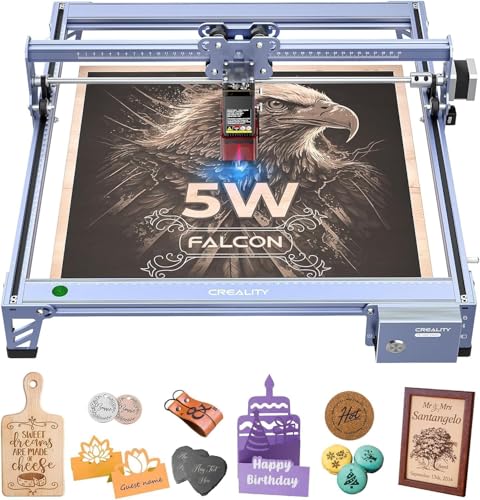
The Creality Falcon 5W Laser Engraver Machine stands out for its high precision, making it an excellent choice for artists and hobbyists who want to create intricate designs on various materials. With a working area of 400x415mm and a maximum speed of 10,000mm/min, you can efficiently tackle high-volume tasks. Its 0.06mm ultra-fine compression spot guarantees detailed engraving accuracy, preserving every nuance of your designs. Plus, the machine’s safety features protect your eyes while it operates. Compatible with over 200 materials, you can easily personalize drinkware, wood, leather, and more, enhancing your DIY projects effortlessly.
Best For: Artists and hobbyists looking for a high-precision engraving solution for intricate designs on various materials.
Pros:
- High engraving accuracy of 0.004 inches allows for detailed and intricate designs.
- Fast engraving speeds of up to 10,000mm/min enhance productivity for high-volume tasks.
- Compatible with over 200 materials, enabling a wide range of creative projects.
Cons:
- The learning curve may be steep for beginners unfamiliar with laser engraving technology.
- The initial cost may be high compared to simpler engraving solutions.
- Limited working area may restrict larger projects or designs.
T1 Laser Engraver Machine (3000mW, Foldable, 200x150mm)

Looking to immerse yourself in the world of laser engraving? The T1 Laser Engraver Machine is your perfect entry point. With a powerful 3000mW laser and a compact working area of 200x150mm, you can easily create stunning designs on wood, acrylic, and coated metals. Its foldable design guarantees portability and easy setup, making it ideal for home, classrooms, or outdoor projects. Plus, it comes fully pre-assembled, so you can start engraving in minutes. With safety features like protective goggles and a complete starter kit, you’ll have everything you need for personalized gifts or DIY crafts. Jump in and release your creativity!
Best For: The T1 Laser Engraver Machine is best for DIY enthusiasts and beginners looking to create personalized projects with ease.
Pros:
- User-friendly: Fully pre-assembled and calibrated for quick setup, allowing you to start engraving within minutes.
- Versatile applications: Engraves on a wide range of materials, making it suitable for various creative projects.
- Portable design: Foldable and compact, perfect for use at home, in classrooms, or outdoors.
Cons:
- Limited working area: The 200x150mm engraving space may not be sufficient for larger projects.
- Power output: While 3000mW is powerful, it may not match the capabilities of higher-end models for more demanding tasks.
- Material restrictions: Not suitable for all types of materials, particularly those that are highly reflective or require specialized equipment.
Factors to Consider When Choosing a Drinkware Laser Engraver
When choosing a drinkware laser engraver, you should consider several key factors. Engraving speed, material compatibility, and precision all play essential roles in achieving the best results. Additionally, don’t overlook safety features and the usability of the software, as they can greatly impact your overall experience.
Engraving Speed Importance
Choosing the right engraving speed is vital, especially if you want to boost your production efficiency. Higher engraving speeds, up to 15,000 mm/s, help you complete multiple projects quickly without sacrificing quality. If you’re working on personalized drinkware, faster speeds are essential for high-volume tasks, enabling you to produce more items in less time. Machines that engrave at 600 mm/s are great for quick tasks, while those at 10,000 mm/min or higher enhance productivity for larger orders. However, keep in mind that precision matters; slower speeds are better for intricate designs, while faster settings suit simpler projects. Make sure your machine’s speed capabilities align with the types of work you plan to undertake for best results.
Material Compatibility Considerations
Ensuring your laser engraver is compatible with various materials is essential for achieving high-quality results on drinkware. Look for an engraver that handles common materials like stainless steel, glass, acrylic, and ceramic. It’s also vital to select a model that accommodates different thicknesses and coatings, as these factors can impact engraving quality and depth. Consider whether the engraver features air assist or cooling systems, which enhance results on reflective or heat-sensitive materials. Additionally, check that the software supports various file formats and offers design features specific to drinkware customization. With these considerations in mind, you’ll be well-equipped to create stunning, personalized gifts that stand out.
Precision and Accuracy Needs
Material compatibility is just one part of the equation; precision and accuracy are equally essential for achieving stunning results on drinkware. When selecting a laser engraver, look for models that offer motion precision of 0.00199mm and repeat precision of 0.000248mm. These specifications guarantee you achieve high-definition accuracy, perfect for intricate designs. A laser spot size of 0.06×0.04mm is ideal for ultra-fine engravings, especially on curved surfaces like mugs. Additionally, high engraving speeds of 600mm/s or more can boost your productivity without sacrificing quality. Consider machines equipped with advanced positioning technologies, such as dual red light systems, to enhance your material alignment and reduce the risk of misalignment during the engraving process.
Safety Features Evaluation
When you’re evaluating safety features for a drinkware laser engraver, it’s important to prioritize models with a Class 1 safety rating, as this indicates ideal protection against laser exposure. Look for machines equipped with protective covers that filter out at least 99% of laser light, minimizing risks during operation. Built-in flame sensors are vital too; they automatically halt the machine if flames are detected, greatly enhancing safety. An emergency stop button is another key feature, allowing you to quickly stop operations in case of an emergency. Additionally, consider models with an enclosed design, which can reduce smoke and noise, creating a safer, more comfortable working environment while you focus on your engraving projects.
Software Usability and Support
Selecting a drinkware laser engraver isn’t just about the hardware; the software usability and support play an important role in your overall experience. Look for user-friendly software that simplifies design and engraving, boosting your productivity. Extensive support is key, so choose engravers that offer features like AI design assistance, material recognition, and a library of project tutorials to help you get started quickly. Make sure the software supports various file formats like DXF, JPG, and PNG, allowing easy import and editing of your designs. Regular software updates and responsive customer support are vital for troubleshooting and enhancing your engraver’s capabilities. Finally, consider systems that integrate with mobile devices, providing you the flexibility to operate and monitor your engraver on the go.