High-resolution document scanners make it easier to turn paper records, books, receipts, and forms into clear, searchable digital files. The right model can also reduce manual feeding, improve organization, and streamline everyday office workflows.
This roundup compares 10 standout options, from compact portable scanners and book-scanning cameras to fast duplex models with wireless connectivity and automatic document feeders.
Best 10 High Resolution Document Scanners Picks for 2026
Best Office Workhorse

- 50-sheet duplex ADF
- OCR and cloud-sharing support
- Double-feed and skew detection
Best For: Home offices and small businesses scanning routine paperwork
Best for Books and Large Originals

- 38MP, 410 dpi image capture
- Flattens curved book pages
- Scans documents up to A3 size
Best For: Books, oversized originals, and overhead scanning
Best Wireless Workflow

- 45 ppm duplex scanning
- 100-sheet feeder
- Wi-Fi 6, USB-C, and touchscreen profiles
Best For: Shared offices and fast wireless document workflows
Best Compact Wireless Pick

- 600 dpi resolution with duplex scanning
- USB and Wi-Fi connectivity
- Compact design for small workspaces
Best For: Home offices needing flexible, everyday scanning
Best Fast Batch Scanner

- Duplex scanning up to 30 ppm/60 ipm
- 20-page feeder for mixed batches
- Compact USB design with ScanSmart software
Best For: Fast desktop document processing over USB
Best Portable Book Scanner

- 13MP overhead camera for A3 and A4 materials
- About one-second scanning with OCR
- Foldable design with document-camera mode
Best For: Books, oversized pages, and teaching workflows
Fast-Feed Workhorse
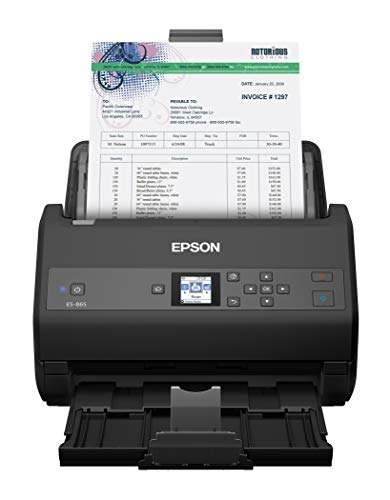
- 600 dpi resolution with 65 ppm/130 ipm duplex scanning
- 100-sheet ADF and up to 7,000 sheets per day
- OCR, TWAIN support, and cloud-storage scanning
Best For: High-volume office document scanning
Wireless Everyday Organizer

- Wireless scanning to devices and cloud services
- 35 ppm/70 ipm duplex scanning with a 50-sheet ADF
- OCR, TWAIN, and automatic image adjustments
Best For: Home offices and small-business paperwork
Screen-Controlled Wireless Scanner

- 4.3-inch touchscreen with wireless scanning
- 100-sheet ADF and 35 ppm duplex performance
- Scan directly to USB, email, or cloud services
Best For: Computer-free home and office scanning
Best Office Workhorse – Epson ES-400 II
The Epson WorkForce ES-400 II is a practical choice among high resolution document scanners for offices that regularly process stacks of paperwork. Its 50-sheet feeder, duplex scanning, OCR, and cloud-sharing tools support efficient everyday document management.
Best For: Home offices and small businesses scanning mixed document batches and creating searchable files.
Pros:
- 50-sheet ADF supports batch scanning.
- Duplex scanning captures both sides efficiently.
- OCR can create searchable PDFs and editable Word or Excel files.
- Includes skew correction and ultrasonic double-feed detection.
Cons:
- USB is the listed connection type; wireless scanning is not specified.
- Its listed resolution is 300 dpi, lower than some models here.
The ES-400 II emphasizes workflow speed and file handling rather than maximum resolution. It is a well-rounded option when reliable feeding, OCR, and cloud integration matter most.
Best for Books and Large Originals – CZUR ET MAX
The CZUR ET MAX stands out among high resolution document scanners with a 38MP sensor, 410 dpi resolution, and a large A3 scanning area. Its curve-flattening technology is designed for bound books and other originals that are difficult to feed through a conventional ADF.
Best For: Books, oversized documents, demonstrations, and users who need detailed overhead scans.
Pros:
- 38MP CMOS sensor captures high-detail images at 7168 × 5376 resolution.
- Curve-flattening technology helps correct bound book pages.
- OCR supports editable and searchable files in more than 180 languages, with stated language limitations.
- Supports Windows, macOS, and specified Ubuntu versions.
Cons:
- Not recommended for glossy or highly reflective materials.
- Its 1.5-second scan speed assumes practiced operation.
- It is a USB-connected overhead scanner rather than a traditional feeder-based desktop scanner.
The ET MAX is the most specialized option in this group. Choose it when book scanning, large formats, and image detail are more important than automatic batch feeding.
Best Wireless Workflow – ScanSnap iX2500
The ScanSnap iX2500 combines high resolution document scanning with a 100-sheet feeder, 45-page-per-minute duplex scanning, and Wi-Fi 6 connectivity. Its touchscreen profiles and support for computers, mobile devices, and cloud services make it suited to shared, flexible workflows.
Best For: Busy offices and households that want fast batch scanning with wireless and touchscreen controls.
Pros:
- Scans both sides at up to 45 pages per minute.
- 100-sheet feeder handles larger batches.
- Wi-Fi 6 and USB-C provide flexible connection options.
- Automatic optimization, naming, and sorting help organize documents, receipts, and photos.
Cons:
- Its advanced feature set may be more than occasional users need.
- Compatibility requirements vary by operating system and device.
The iX2500 is a strong fit for users who value speed and connectivity as much as scan quality. Its large feeder and touchscreen-oriented workflow make it particularly convenient for recurring, shared scanning tasks.
Best Plug-and-Scan Option – Canon imageFORMULA R30
The Canon imageFORMULA R30 is a straightforward pick among high resolution document scanners for users who want quick setup. It connects by USB, uses embedded software without installation, and scans both sides of documents at up to 25 pages per minute.
Best For: Windows users who need simple, recurring scans of documents, invoices, contracts, and cards.
Pros:
- Plug-and-scan design requires no software installation.
- 60-sheet ADF supports individual documents and mixed batches.
- Duplex scanning reaches up to 25 pages per minute.
- 600 dpi resolution and searchable digital formats support detailed archiving.
Cons:
- USB is the listed connection type; wireless connectivity is not included.
- TWAIN and ISIS drivers are not supported.
- Listed minimum system requirements specify Windows 7.
The R30 prioritizes simplicity over broad integration. It is a sensible choice when you want a dedicated USB scanner that can handle common office materials with minimal setup.
Best Compact Wireless Pick – ScanSnap iX1300
If you want high resolution document scanners with flexible connectivity, the ScanSnap iX1300 is a compact option for home offices and small workspaces. Its 600 dpi resolution, duplex scanning, 30 ppm speed, automatic image adjustments, and USB or Wi-Fi support make it suitable for everyday paperwork and mixed media.
Best For: Small offices and home users who want wireless or USB scanning for documents, receipts, cards, photos, and cloud workflows.
Pros:
- Compact design takes up little desk space.
- 600 dpi resolution supports detailed document and photo scans.
- Duplex scanning reaches up to 30 ppm with automatic de-skew, color optimization, and blank-page removal.
- Works with computers, mobile devices, cloud services, and Chromebooks through the mobile app.
Cons:
- The 20-sheet capacity may require refilling for larger batches.
- Some features depend on compatible software and operating systems.
The iX1300 stands out when space and connectivity matter as much as scan quality. Its automatic corrections and ScanSnap Home software also make it approachable for users who do not want to manage complicated driver settings.
Best Fast Batch Scanner – Epson WorkForce ES-C220
For shoppers comparing high resolution document scanners for routine paperwork, the Epson WorkForce ES-C220 focuses on fast, straightforward duplex scanning. Its single-step capture scans both sides at up to 30 ppm or 60 ipm, while the 20-page ADF helps process varied stacks in a compact footprint.
Best For: Users who primarily scan standard documents and cards over USB and want automatic image cleanup with simple desktop software.
Pros:
- Scans both sides in one pass at up to 30 ppm/60 ipm.
- Compact design is intended to save desk space.
- 20-page ADF handles batches of varying paper sizes.
- ScanSmart includes cropping, blank-page deletion, background removal, skew correction, OCR help, and file-name suggestions.
Cons:
- USB is the listed connection type; wireless scanning is not specified.
- The supplied specifications list 300 dpi resolution, lower than some high-resolution alternatives.
- Windows 7 is the stated minimum system requirement, so current compatibility should be checked.
The ES-C220 is a practical choice when speed, automatic cleanup, and a small footprint are more important than wireless features or maximum listed resolution. Its flexible scan path also supports cards and passports.
Best Portable Book Scanner – CZUR Shine Ultra
The CZUR Shine Ultra takes a different approach to high resolution document scanners, using a 13MP CMOS camera for overhead scanning rather than a conventional sheet-fed design. It handles A3 and A4 materials, scans a page in about one second, and adds book flattening, OCR, document-camera, and image-processing features.
Best For: Students, educators, and users who need a portable overhead scanner for books, flat documents, A3 materials, or remote teaching.
Pros:
- 13MP camera captures A3 and A4 materials at approximately 245 and 340 dpi, respectively.
- Scans pages in about one second and supports documents smaller than A3.
- OCR supports more than 180 languages, with listed exclusions for Thai, Hebrew, and Arabic.
- Foldable, height-adjustable design includes a foot pedal and USB document-camera functionality.
Cons:
- USB is the listed connection type, and Android and iOS are not supported.
- Book flattening is intended for thinner books; thicker volumes may require another CZUR model.
- It is an overhead camera scanner rather than a traditional automatic document feeder.
The Shine Ultra is compelling for books, oversized pages, and flexible presentation use. Its camera-based design and portable folding neck offer capabilities a conventional desktop sheet scanner may not, though it requires a suitable Windows or macOS computer.
Fast-Feed Workhorse – Epson Workforce ES-865
The Epson Workforce ES-865 is a strong choice among high resolution document scanners for offices that regularly process large paper batches. Its 600 dpi resolution, 65 ppm/130 ipm duplex speed, and 100-sheet feeder make it suited to demanding scanning workflows.
Best For: Busy offices and users who need high-volume, fast duplex scanning with OCR and broad software compatibility.
Pros:
- Scans up to 65 ppm/130 ipm and captures both sides in one pass.
- 100-sheet ADF and a peak daily duty cycle of up to 7,000 sheets.
- 600 dpi resolution, built-in OCR, TWAIN support, and cloud-scanning options.
- Includes skew correction, double-feed detection, and a slow-speed mode for delicate sheets.
Cons:
- USB is the listed connection type, so wireless scanning is not included in the supplied specifications.
- Its high-speed, high-volume design may be more scanner than occasional users need.
The ES-865 prioritizes throughput without giving up useful document-handling features. Choose it when speed, capacity, and 600 dpi scanning matter more than wireless convenience.
Wireless Everyday Organizer – Epson Workforce ES-500W II
The Epson Workforce ES-500W II combines wireless convenience with practical duplex scanning for home offices and small businesses. As one of these high resolution document scanners, it handles up to 35 ppm/70 ipm and supports common documents, cards, contracts, and extra-long pages.
Best For: Users who want wireless scanning, OCR, cloud access, and a compact 50-sheet desktop workflow.
Pros:
- Wireless scanning to computers, mobile devices, and cloud-storage accounts.
- Scans both sides in one pass at up to 35 ppm/70 ipm.
- 50-sheet ADF accommodates multiple paper types and sizes.
- Includes OCR, TWAIN support, automatic file naming, and image cleanup tools.
Cons:
- The supplied resolution specification is 300 dpi, lower than the ES-865’s 600 dpi.
- Its feeder capacity and speed are more modest than higher-volume models.
The ES-500W II is a balanced option for digitizing everyday paperwork without being tied to a USB-only setup. Its wireless features and included software make sharing and organizing scans straightforward.
Screen-Controlled Wireless Scanner – Epson Workforce ES-580W
The Epson Workforce ES-580W is a convenient wireless desktop scanner for users who want to manage scans directly from the device. It combines a 100-sheet ADF, 35 ppm duplex scanning, a 4.3-inch touchscreen, and direct-to-USB, email, or cloud workflows.
Best For: Home and office users who value computer-free scanning, touchscreen controls, and a larger feeder for routine batches.
Pros:
- 4.3-inch touchscreen and wireless connectivity simplify scan control.
- 100-sheet ADF handles varied paper types and sizes.
- Scans up to 35 pages per minute and captures both sides in one pass.
- Can save directly to USB, email, and cloud services, with OCR for searchable files.
Cons:
- The supplied resolution specification is 300 dpi, rather than 600 dpi.
- It is designed for desktop use and may be more feature-rich than needed for occasional scanning.
The ES-580W stands out for reducing dependence on a computer during routine scanning. Its touchscreen, wireless features, and 100-sheet feeder make it especially practical for organized home-office or small-office workflows.
How We Picked the Best High Resolution Document Scanners
We focused on the features that matter most in real scanning workflows: optical resolution, scan speed, duplex performance, automatic document feeder capacity, connectivity, software requirements, portability, and document-handling flexibility. The selection includes desktop scanners for high-volume offices, compact models for smaller workspaces, and overhead scanners designed for books or bound materials.
We also considered whether each scanner suits common tasks such as archiving paperwork, digitizing receipts, capturing forms, scanning photos, and creating searchable PDFs. A high resolution rating is useful, but it is only one part of an effective document-scanning setup.
Quick Comparison
| Best For | Look For |
|---|---|
| High-volume office scanning | Fast duplex speeds, a large ADF, and reliable paper handling |
| Wireless home-office use | Wi-Fi connectivity, straightforward setup, and searchable PDF support |
| Small desks or occasional scanning | Compact dimensions, USB power, and a smaller footprint |
| Books and bound documents | Overhead capture, page-flattening tools, and a high-resolution camera |
| Plug-and-scan convenience | Minimal installation and simple controls |
Key Buying Factors for High Resolution Document Scanners
Resolution and Image Quality
For ordinary text documents, 300 dpi is usually sufficient; 600 dpi is more useful for small print, detailed graphics, photos, and archival work. Check whether the advertised resolution is optical rather than interpolated, and look for automatic color detection, deskewing, blank-page removal, and background cleanup.
Duplex Scanning and Feeder Capacity
Duplex scanning captures both sides of a page in one pass, which is valuable for forms, invoices, and double-sided records. A larger ADF reduces interruptions during batch jobs, while dependable separation and paper-path handling help prevent jams and double feeds.
Speed, Connectivity, and Software
Compare rated pages per minute with the way you work. Wireless models are convenient for shared spaces, while USB connections can offer a direct, dependable workflow. Searchable PDF creation, OCR, cloud support, and compatibility with your computer or mobile devices can be just as important as raw speed.
Size and Document Flexibility
Compact scanners suit apartments, mobile workstations, and occasional users. Desktop units are better for sustained batches. If you need to scan books, magazines, fragile pages, or other bound materials, choose an overhead document camera rather than a conventional sheet-fed design.
Who Should Buy Which High Resolution Document Scanners?
Choose a fast desktop duplex scanner if you regularly process contracts, invoices, tax records, or office files. A wireless desktop model is the better fit for shared home offices and small teams that scan from multiple devices. For limited space or travel, a compact scanner offers easier storage and setup.
Book collectors, researchers, teachers, and archivists should prioritize an overhead model with a high-resolution camera and software designed for curved or facing pages. If simplicity is your priority, select a plug-and-scan option with minimal software installation. Before buying, confirm operating-system compatibility, available desk space, expected daily volume, and whether your most common documents fit the feeder or require a flat, overhead capture method.