If you’re starting your journey into CNC machining, finding the right mini CNC machine can be overwhelming. However, selecting a beginner-friendly model can make all the difference in your experience. Each option offers unique features, making it easier for you to explore various materials and techniques. But how do you choose the best one for your needs? Let’s break down the top contenders to help you make an informed decision.
SainSmart Genmitsu 3018-PROVer V2 CNC Router Machine for Beginners

The SainSmart Genmitsu 3018-PROVer V2 CNC Router Machine is the perfect choice for beginners looking to plunge into the world of CNC machining. With its pre-assembled parts, you can set it up in under an hour, making it incredibly user-friendly. This machine excels at engraving materials like wood, acrylic, and soft metals, allowing you to create unique artwork or personalized gifts effortlessly. You can easily enhance its functionality with accessories like extension kits and powerful spindles. Plus, it’s compatible with popular CAD/CAM software, so you can turn your creative ideas into reality with ease and confidence.
Best For: Beginners looking to start their journey in CNC machining with an easy-to-use and versatile machine.
Pros:
- Pre-assembled parts allow for quick setup in under an hour.
- Capable of engraving a wide variety of materials, including wood, acrylic, and soft metals.
- Compatible with popular CAD/CAM software for easy design and GCode conversion.
Cons:
- Limited to softer materials, which may restrict advanced projects.
- May require additional accessories for more complex tasks and functionalities.
- Smaller working area compared to more advanced CNC machines, which could be a limitation for larger projects.
Genmitsu CNC 3018-PRO Router Kit for Wood and Plastic Carving

For those stepping into the world of CNC machining, the Genmitsu CNC 3018-PRO Router Kit stands out as an excellent choice. It features a GRBL-controlled 3-axis system, perfect for carving plastic, wood, and more. The kit boasts a working area of 300 x 180 x 45 mm, ensuring versatility in your projects. With pre-positioned components and improved assembly, you’ll find it easy to set up. The router supports a maximum spindle speed of 20,000 RPM, giving you precision in your work. Plus, it includes Carveco Maker CAM software, making design and control simple and efficient.
Best For: hobbyists and beginners looking for an accessible entry into CNC machining for wood and plastic projects.
Pros:
- Easy to assemble with pre-positioned components, making it beginner-friendly.
- High maximum spindle speed of 20,000 RPM for precise and efficient carving.
- Includes compatible design software (Carveco Maker) for streamlined project creation and control.
Cons:
- Limited working area (300 x 180 x 45 mm) may restrict larger projects.
- Requires a corded electric power source, which may limit placement options.
- Customer reviews indicate potential learning curve for software usage.
LONGER Ray5 Mini Laser Engraver

Looking to immerse yourself in the world of laser engraving without the steep learning curve? The LONGER Ray5 Mini Laser Engraver is your perfect entry point. With a high-speed cutter reaching 12,000mm/min and an engraving area of 140x130mm, you can tackle over 300 materials including wood and metal. Weighing just 1.8kg, it’s portable and beginner-friendly, coming pre-assembled and ready to use. Plus, it offers multiple connection options for convenience. With safety features like protective glasses and an emergency stop button, you can work confidently. Rated 4.3 stars, it’s ideal for personalized gifts and creative projects!
Best For: The LONGER Ray5 Mini Laser Engraver is best for beginners and hobbyists looking to explore laser engraving and cutting without a complex setup.
Pros:
- User-friendly: Pre-assembled and easy to use right out of the box.
- Versatile: Capable of engraving and cutting over 300 materials, including wood, metal, and leather.
- Safety features: Equipped with protective glasses and an emergency stop button for safe operation.
Cons:
- Limited engraving area: The 140x130mm engraving area may not suit larger projects.
- Laser power: With a 2.5W laser, it may not be as powerful as some professional models for heavy-duty tasks.
- Software limitations: The free software option may not have all features available in paid alternatives.
FoxAlien Masuter Pro 3-Axis CNC Router Machine

Designed with beginners in mind, the FoxAlien Masuter Pro 3-Axis CNC Router Machine offers an all-aluminum structure that enhances stability and precision, making it perfect for hobbyists and DIY enthusiasts. Its linear rail Z-axis greatly improves engraving and cutting performance across materials like wood, acrylic, and MDF. You’ll appreciate the user-friendly design, featuring a compact controller with safety buttons for peace of mind. With two spindle clamps included and options for customization, you can easily tailor this machine to your needs. Assembly is a breeze, taking just 10-15 minutes, so you can dive right into your projects!
Best For: Hobbyists and DIY enthusiasts seeking a reliable and user-friendly CNC router for various materials.
Pros:
- All-aluminum structure enhances durability and precision for high-quality results.
- Quick assembly (10-15 minutes) allows users to start projects without extensive setup time.
- Customizable spindle options cater to different carving needs and project sizes.
Cons:
- Limited engraving surface area may not accommodate larger projects without additional expansion kits.
- The included spindle clamps may require additional purchases for specific spindle sizes.
- Some users may find the learning curve steep if unfamiliar with CNC operations.
CNCTOPBAOS 1610 PRO CNC Milling Machine

The CNCTOPBAOS 1610 Pro CNC Milling Machine stands out as an excellent choice for beginners enthusiastic to explore the world of CNC routing. This compact 3-axis desktop DIY mini CNC router kit excels at engraving and cutting materials like wood, acrylic, and soft metals. With a 7.08 x 3.93 x 1.77-inch working area, it’s perfect for small projects. The upgraded GRBL control board guarantees ease of use, while the offline controller allows you to operate without a computer. Weighing just 11.27 pounds, it’s portable and efficient, making it a fantastic addition to any hobbyist’s toolkit.
Best For: Beginners and hobbyists looking to explore CNC routing with a compact and user-friendly machine.
Pros:
- Compact Size: Ideal for small projects with a working area of 7.08 x 3.93 x 1.77 inches.
- Upgraded Control Board: The GRBL control board enhances usability and includes features like an emergency stop button and tool setting port.
- Offline Operation: The included offline controller allows for easy operation without needing a computer.
Cons:
- Limited Working Area: The small working area may not be suitable for larger projects.
- Lower Max Speed: The spindle speed is capped at 10,000 RPM, which may limit cutting efficiency for some materials.
- Basic Customer Ratings: With a 3.8 out of 5 stars rating, some users may have experienced issues or limitations.
CNCTOPBAOS 1610 PRO Mini CNC Router Kit

If you’re a beginner enthusiastic to plunge into the world of CNC machining, the CNCTOPBAOS 1610 PRO Mini CNC Router Kit stands out as an excellent choice. This 3-axis desktop engraver offers a working area of 7.08 x 3.93 x 1.77 inches, perfect for projects on materials like acrylic, wood, and soft metals. With a powerful 120W spindle and a maximum speed of 10,000 RPM, you can achieve precision in your designs. The kit includes GRBL software for easy setup, and it’s compatible with various operating systems. Plus, it comes with a 30-day return policy, ensuring peace of mind with your purchase.
Best For: Beginners looking to explore CNC machining with a compact and user-friendly router kit.
Pros:
- Easy to set up with included GRBL software and installation instructions.
- Versatile applications for engraving on various materials such as wood, acrylic, and soft metals.
- Compact size makes it suitable for small workspaces.
Cons:
- Limited working area may not accommodate larger projects.
- Customer rating of 3.8/5 suggests mixed feedback on performance and reliability.
- Maximum spindle speed of 10,000 RPM may not meet the needs of advanced users requiring higher speeds.
RATTMMOTOR CNC1610-PRO Mini CNC Router Machine Kit
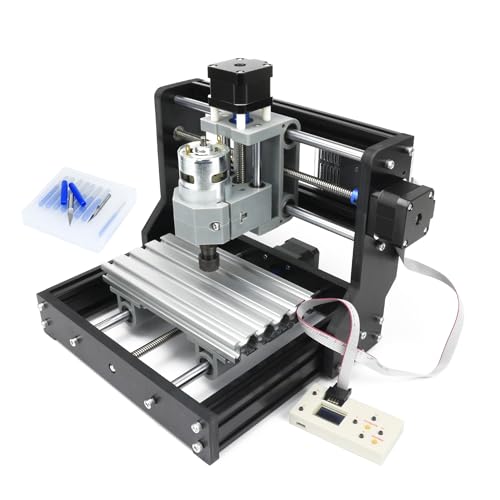
For DIY carving enthusiasts and beginners, the RATTMMOTOR CNC1610-PRO Mini CNC Router Machine Kit offers an accessible entry into the world of CNC machining. With a compact frame size of 30x26x25 cm and a working area of 18x10x4.5 cm, it’s perfect for engraving and milling various materials like wood, plastic, and soft metals. Assembly is straightforward, thanks to the included manual and USB flash drive with files. Controlled via Grblcontrol software, it supports multiple operating systems and connects easily via USB. The robust aluminum alloy frame and 775 spindle motor guarantee reliable performance for all your projects.
Best For: DIY carving enthusiasts and beginners looking for an affordable and compact CNC router for various materials.
Pros:
- Easy assembly and operation, ideal for beginners.
- Versatile applications for engraving and milling multiple materials.
- Compact design with a robust aluminum alloy frame for durability.
Cons:
- Limited working area may not accommodate larger projects.
- Not suitable for hard metals or glass materials.
- Requires a power supply and compatible software for operation.
Genmitsu Cubiko CNC Router Machine

Designed with beginners in mind, the Genmitsu Cubiko CNC Router Machine offers a user-friendly experience right out of the box. It’s perfect for PCB milling, woodworking, and engraving various materials like wood, acrylic, and metal. With automatic tool height adjustments and smart surface measurements, you’ll achieve smooth, precise carvings every time. The machine supports popular software like Fusion 360 and Easel, making it easy to design projects. Plus, its enclosed design minimizes dust and noise while keeping you safe, thanks to the cover-open auto-stop feature. Get ready to unleash your imagination with this reliable and efficient CNC machine!
Best For: Beginners and hobbyists looking for an accessible and efficient CNC machine for various projects like PCB milling, woodworking, and engraving.
Pros:
- User-friendly: Ready to use out of the box with step-by-step tutorials, making it ideal for beginners.
- Precision performance: Achieves a high level of detail with a precision of ±0.1mm, suitable for intricate work on hard metals.
- Safety features: Enclosed design reduces dust and noise, with an auto-stop function that enhances user safety.
Cons:
- Limited to specific materials: While effective for wood, acrylic, and metal, it may not be suitable for other materials.
- Requires compatible software: Must use supported applications like Fusion 360 or Easel, which may have a learning curve.
- Depth limitation: Maximum cutting depth per pass is only 0.5mm, which may require multiple passes for thicker materials.
CNCTOPBAOS CNC 3018-PRO Wood Router Kit
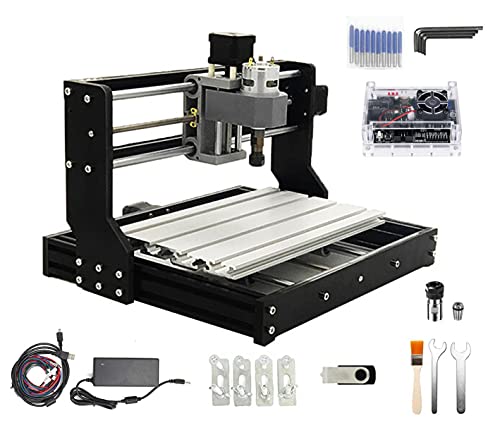
The CNCTOPBAOS CNC 3018-PRO Wood Router Kit stands out as an ideal choice for hobbyists and beginners enthusiastic to explore the world of CNC machining. This compact desktop router features a 300x180x45mm working area, making it perfect for various projects. Its sturdy resin frame and aluminum alloy workbench guarantee durability while remaining lightweight. With a powerful 775 spindle motor reaching up to 20,000 RPM, you can engrave materials like wood, acrylic, and soft metals effortlessly. The kit includes a USB flash drive with GRBL software, making setup a breeze. Immerse yourself in your CNC journey with this user-friendly machine!
Best For: Hobbyists and beginners looking to explore CNC machining with a user-friendly and compact router.
Pros:
- Lightweight and durable construction with a resin frame and aluminum alloy workbench.
- Powerful spindle motor capable of reaching up to 20,000 RPM for efficient engraving.
- Includes a USB flash drive with GRBL software for easy setup and operation.
Cons:
- Limited working area of 300x180x45mm may not accommodate larger projects.
- Requires a computer for operation, which may be a barrier for some users.
- May have a learning curve for those unfamiliar with CNC technology and software.
RATTMMOTOR Upgrade 3018-PRO CNC Wood Router Machine Kit

If you’re new to CNC machining and looking for an accessible entry point, the RATTMMOTOR Upgrade 3018-PRO CNC Wood Router Machine Kit stands out with its user-friendly design and extensive guidance. This 3-axis GRBL mini CNC machine is perfect for cutting wood, plastic, and acrylic, among other materials. Its durable yet lightweight build features orange bakelite resin boards and an aluminum alloy work surface. You’ll appreciate the detailed instructions and helpful videos that simplify assembly. Plus, safety features like an emergency stop button and limit switches guarantee a secure experience. With a maximum spindle speed of 20,000 RPM, this machine delivers impressive performance.
Best For: Beginners and hobbyists looking for an affordable and user-friendly CNC router for woodworking and similar materials.
Pros:
- Easy to assemble with detailed instructions and instructional videos.
- Lightweight and durable design with quality materials like aluminum alloy and stainless steel.
- Safety features such as an emergency stop button and limit switches enhance user protection.
Cons:
- Limited to soft materials; cannot cut hard materials like metals or ceramics.
- May require additional setup or calibration for optimal performance.
- The spindle speed, while high, might not be sufficient for advanced machining needs.
Factors to Consider When Choosing a Mini CNC Machine for Beginners
When you’re choosing a mini CNC machine, several factors can make a big difference in your experience. Think about ease of assembly, material compatibility, and software support to guarantee you get started without hassle. Also, consider safety features, size, and portability to match your workspace and projects.
Ease of Assembly
Choosing a mini CNC machine that’s easy to assemble can make your introduction to CNC machining much smoother. Look for models with pre-assembled main components, allowing you to set up in under an hour. Clear and organized cable management also simplifies the process, reducing errors during assembly. Detailed step-by-step manuals or instructional videos are invaluable, helping you grasp the assembly process thoroughly. Additionally, consider machines with user-friendly designs and labeled parts to make identification easier. If you prefer convenience, opt for a model with an offline controller, enabling operation without a computer during setup. By prioritizing ease of assembly, you can focus more on your projects and less on frustrating setup challenges.
Material Compatibility
Material compatibility is essential for beginners selecting a mini CNC machine, as it directly affects the types of projects you can tackle. Make sure the machine can handle materials like wood, plastic, acrylic, and soft metals such as aluminum and copper. Check the specifications for maximum spindle speed and power; these influence how well the machine cuts or engraves different materials. Look for versatility, as compatibility with materials like density board, PVC, and PCB can expand your project options. Consider the precision needed for your designs; machines with finer laser spots or high accuracy ratings are better for intricate work. Finally, evaluate features like tool height adjustment that can optimize cutting settings for specific materials.
Software Support
Selecting a mini CNC machine involves more than just understanding material compatibility; software support plays a significant role in your overall experience. Verify your machine is compatible with popular CAD/CAM software like Carveco, Fusion360, and Easel for seamless design and GCode conversion. Look for models that support open-source software such as GRBL, which offers flexibility and ease of use without needing extensive programming knowledge. It’s also helpful if the machine comes with additional software like Candle or LaserGRBL to enhance your workflow. Check for a USB flash drive containing installation instructions and user manuals, which can be invaluable for beginners. Finally, evaluate the availability of online resources or support communities to assist you with any software-related questions.
Safety Features
When it comes to using a mini CNC machine, ensuring your safety is just as important as the machine’s performance. Look for machines with emergency stop buttons, allowing you to halt operations instantly in emergencies. Models equipped with X/Y/Z axis limit switches are essential, as they automatically stop the machine if it exceeds its operational range. Additionally, consider machines with protective enclosures to minimize dust and noise, creating a safer workspace. Don’t forget about personal safety—ensure your mini CNC comes with safety goggles or protective gear to shield your eyes during cutting and engraving. Finally, opt for machines that include clear assembly instructions and safety guidelines to help you understand operational limits and protocols.
Size and Portability
Choosing the right mini CNC machine involves careful consideration of size and portability to match your workspace and project needs. You’ll find working area sizes ranging from compact dimensions like 7.08 x 3.93 inches to larger areas of about 300 x 180 mm, which affects the types of projects you can tackle. Portability is key for beginners; machines weighing between 5 to 15 pounds are easier to move and store, giving you flexibility in your workspace. Look for compact designs that fit into smaller areas, perfect for home use or shared environments. Many mini CNC machines come pre-assembled or require minimal setup, allowing you to jump into your projects quickly while ensuring your workspace remains organized.
Power and Speed
For beginners, understanding power and speed can greatly impact your experience with a mini CNC machine. The maximum spindle speed is vital; many machines reach up to 20,000 RPM, making cutting and engraving efficient. Consider the power rating, which typically ranges from 120W to 300W, as it influences the machine’s capabilities. A higher spindle speed improves engraving accuracy, but make sure your motor can handle it without overheating. Machines with adjustable spindle speeds offer flexibility, letting you customize performance for different materials, from soft plastics to harder woods. A consistent power supply, usually at 24 volts, is essential to maintain reliable performance during extended use, guaranteeing precision in all your projects.
Budget Considerations
Budgeting for a mini CNC machine can be straightforward if you keep a few key factors in mind. First, consider the total cost, which usually ranges from $200 to $800, including essential accessories and software. Your budget may influence your choice between entry-level models with basic functions and more advanced machines that offer enhanced features. Don’t forget to factor in additional costs for materials, maintenance, and potential upgrades, as these can add up quickly. Many entry-level machines come with included software, saving you from extra expenses. Investing in a slightly higher-priced model might provide better durability and features, which can lead to long-term savings and a more satisfying experience as you commence your CNC journey.
Upgrade Options
When you’re diving into the world of mini CNC machines, considering upgrade options can greatly enhance your experience and expand your project possibilities. Look for machines that offer optional upgrade kits, like Y-axis extensions, to increase your working area for larger projects. Upgrading to a more powerful spindle can markedly improve cutting performance, with speeds typically ranging from 10,000 to 20,000 RPM. Features like offline controllers let you operate your CNC without needing a constant computer connection, adding convenience. Additionally, customizable spindle clamp sizes allow for various spindle types, tailoring your setup to different materials. Finally, verify your machine is compatible with advanced software upgrades to access more design and control capabilities.