Choosing among receipt printers for food trucks means balancing portability, print speed, connectivity, and reliable operation in a compact service environment. The right model should fit your POS setup without slowing down orders during a rush.
Our roundup covers compact 58mm Bluetooth printers and faster 80mm countertop units, including options with auto cutters, Ethernet, USB, and cash-drawer support.
Best 10 Receipt Printers for Food Trucks Picks for 2026
Best Portable Android Pick
Loyverse-Friendly Mini Bluetooth Printer

- Rechargeable and cable-free for mobile service
- Uses economical 58mm direct thermal paper
- Supports selected Android and Windows workflows
Best For: Android food trucks using compatible POS apps
Best High-Volume Option
Volcora 80mm Wi-Fi POS Printer

- Prints up to 260mm/s with an automatic cutter
- Supports Wi-Fi, USB, Ethernet, and cash drawers
- Includes a wall-mount option for tight spaces
Best For: Busy food trucks with compatible powered POS systems
Best Flexible Paper-Width Pick
Rongta RPP300 Portable Printer

- Accepts 80mm and compatible 58mm paper
- Provides Bluetooth and USB connectivity
- Compact 335g design uses ESC/POS commands
Best For: Mobile sellers needing flexible paper sizes and connections
Best USB-Only Pick
NetumScan 80mm POS Receipt Printer

- 300mm/s printing with auto cutter
- Works with Windows, Mac, and Linux
- USB-only; verify POS compatibility
Best For: Computer-based food truck POS setups
Best Multi-Port Option
Rongta RP820 80mm Thermal Printer
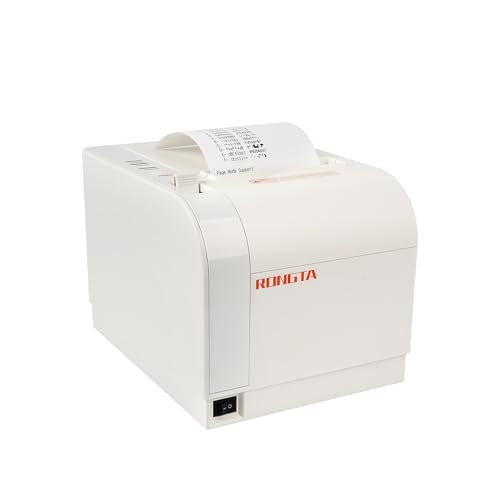
- USB, LAN, and serial connectivity
- 300mm/s speed with auto cutter
- No Wi-Fi or Bluetooth; platform limits apply
Best For: Wired POS systems needing flexible connections
Best Portable Pick
MRBOSS E2000 58mm Receipt Printer

- Compact 58mm thermal printer
- USB and Bluetooth connectivity
- 90mm/s speed with cash-drawer port
Best For: Mobile app-based food truck setups
Best Value Wired Pick
Rongta 80mm Thermal POS Printer

- 250 mm/sec printing with auto cutter
- USB, serial, and Ethernet connectivity
- Wall-mountable, ink-free direct thermal design
Best For: Food trucks using a compatible wired computer-based POS system
Fastest Premium Option
Epson TM-T20IV Thermal Printer

- Up to 310 mm/sec printing
- USB, serial, and Ethernet interfaces
- 2 million-cut auto cutter and 3-year warranty
Best For: High-volume operations needing fast, durable wired POS printing
Best for Configurable Wired Setups

- 250 mm/sec printing with auto cutter
- USB, serial, and Ethernet with TCP/IP support
- Adjustable settings and 80mm/58mm paper options
Best For: Computer-based food trucks needing flexible wired configuration
Best Portable Android Pick – Loyverse-Friendly Mini Bluetooth Printer
For food trucks needing receipt printers for food trucks without a power outlet, this compact Bluetooth thermal model is designed for Android and Windows use. Its rechargeable battery and 58mm paper format suit mobile, low-volume transactions, but software compatibility should be confirmed before buying.
Best For: Android-based food trucks, market stalls, delivery drivers, and other mobile sellers using one of the listed supported apps.
Pros:
- Rechargeable battery supports printing away from a power outlet.
- Bluetooth connectivity enables cable-free printing from compatible mobile devices.
- Direct thermal printing requires no ink, ribbon, or cartridge.
Cons:
- Does not support Square, Clover, Shopify, DoorDash, Uber Eats, and many other listed platforms.
- Limited to 58mm thermal paper.
- Compatibility is centered on Android; the listed software support is not universal.
This is a practical choice when your food truck runs Android with a supported POS app. Verify the exact software and device combination first, since the extensive list of unsupported platforms may rule it out for some setups.
Best High-Volume Option – Volcora 80mm Wi-Fi POS Printer
For busy food trucks that need receipt printers for food trucks with faster output and larger receipts, the Volcora combines 80mm printing, Wi-Fi or USB connectivity, and an automatic cutter. Its broad device support is useful, though specific POS software exclusions remain important.
Best For: High-volume food trucks, kitchens, and compact service counters using Windows, Mac, Linux, Android, iOS, or Raspberry Pi-compatible setups.
Pros:
- Prints at up to 260mm/s for faster order and receipt handling.
- Automatic cutter is rated for up to 1.5 million cuts.
- Offers Wi-Fi, USB, Ethernet, and an RJ11 cash-drawer connection.
- Wall-mount option helps conserve limited counter space.
Cons:
- Does not support Uber Eats, Grubhub, DoorDash, Postmates, Clover, or Shopify POS software.
- USB connectivity has narrower operating-system support than the Ethernet interface.
- Requires a suitable power and mounting arrangement for mobile use.
The Volcora is the strongest fit here for speed, connectivity, and repeated cutting. It is less suitable for a purely battery-powered setup, so confirm both the POS integration and your food truck’s available power before choosing it.
Best Compact Budget Choice – MUNBYN IMP001 58mm Wireless Printer
The MUNBYN IMP001 is a compact option for food trucks looking for receipt printers for food trucks that can travel between indoor and outdoor service areas. It connects by Bluetooth to Android devices or by USB to Windows computers, with a rechargeable-style operating design focused on portability and standby time.
Best For: Android food trucks and small restaurants using supported POS apps such as Loyverse, CashSale POS, or Zobaze POS.
Pros:
- Small, lightweight design includes a belt for carrying or wearing.
- Offers an advertised 5–6 days of standby time with auto-sleep and auto-wake functions.
- Produces clear 203 dpi monochrome receipts.
- Includes a thermal paper roll, USB cable, power adapter, and user materials.
Cons:
- Not compatible with iPad, iPhone, iOS, Mac, Square, DoorDash, or Zettle POS.
- Bluetooth is limited to a device distance of no more than 3 meters.
- Computer connection requires Windows and a USB cable.
This printer makes sense for a small Android-centered operation that values a compact footprint and long standby time. Its narrow compatibility list means it should be selected only after confirming your POS app and device requirements.
Best Flexible Paper-Width Pick – Rongta RPP300 Portable Printer
The Rongta RPP300 gives food truck operators a portable receipt-printer option with both Bluetooth and USB connections. It accepts 80mm paper and is compatible with 58mm width, making it useful for sellers who want more flexibility in receipt format.
Best For: Mobile food businesses that need Bluetooth and USB connectivity and want to use either 80mm or compatible 58mm thermal paper.
Pros:
- Supports 80mm thermal paper and is compatible with 58mm width.
- Bluetooth and USB connections support phone and computer workflows.
- Compact, lightweight design weighs about 335g.
- Uses the standard ESC/POS instruction set for compatible software.
Cons:
- Does not support Square, Chromebook, Uber Eats, or Clover POS.
- Requires the ELabel app for phone connection and a driver for laptop use.
- Uses a 40mm maximum roll diameter, which limits roll capacity.
The RPP300 is a versatile choice when paper-width flexibility matters more than broad mainstream POS compatibility. Check that your selected app supports its ESC/POS workflow and plan for the listed setup steps before service.
Best USB-Only Pick – NetumScan 80mm POS Receipt Printer
For food trucks using a Windows, Mac, or Linux computer, this NetumScan is a fast 80mm option among receipt printers for food trucks. Its USB-only connection, 300mm/s print speed, auto cutter, and wall-mounting holes suit a compact counter or service station, but compatibility should be confirmed before buying.
Best For: Food trucks running a compatible computer-based POS system and needing fast USB receipt printing.
Pros:
- Prints at speeds up to 300mm/s.
- Auto cutter helps keep receipts from falling to the ground.
- Supports Windows, Mac, and Linux, with optional wall mounting.
- Uses thermal paper, so no ink or ribbons are needed.
Cons:
- USB-only; it does not support LAN, Wi-Fi, or Bluetooth.
- Not compatible with Square POS, iOS, Uber Eats, Clover, Postmates, Shopify, Lightspeed, or mobile Android and Apple devices.
This is a practical choice when your food truck operates from a supported computer and has a reliable USB setup. It is less suitable for mobile-first POS systems or platforms listed as incompatible.
Best Multi-Port Option – Rongta RP820 80mm Thermal Printer
The Rongta RP820 gives food trucks more connection flexibility than a USB-only model, with USB, LAN, and serial ports. It supports 80mm paper, prints at up to 300mm/s, and can sit on a counter or mount on a wall, making it a versatile option among receipt printers for food trucks.
Best For: Food trucks that need USB, Ethernet, or serial connectivity and want a wall-mountable 80mm printer.
Pros:
- Offers USB, LAN, and serial interfaces.
- Prints at up to 300mm/s and includes an auto cutter.
- Supports cash-drawer driving and ESC/POS commands.
- Wall-hanging design can save limited counter space.
Cons:
- Does not support Wi-Fi or Bluetooth.
- Not compatible with Grubhub, DoorDash, Square, or Chromebook.
- Its 203 dpi resolution is more basic than higher-resolution models.
Choose the RP820 when wired connectivity matches your POS workflow and you value installation flexibility. Its broad port selection is useful, but the listed platform restrictions make system verification essential.
Best Portable Pick – MRBOSS E2000 58mm Receipt Printer
For a food truck that prioritizes a small footprint and wireless convenience, the MRBOSS E2000 uses 58mm thermal paper and supports USB plus Bluetooth. Its 90mm/s print speed is slower than larger 80mm models, but its compact design and smartphone support make it a practical portable choice among receipt printers for food trucks.
Best For: Mobile food truck operators using a supported Android or iOS app and needing a compact Bluetooth printer.
Pros:
- Compact, lightweight design for limited workspaces.
- Supports USB and Bluetooth connections.
- Prints at 90mm/s without ribbons or cartridges.
- Includes a cash-drawer port and 12-month warranty.
Cons:
- Uses narrower 58mm paper rather than standard 80mm rolls.
- Bluetooth use requires a compatible device or app.
- Slower than the two 300mm/s models in this roundup.
The E2000 is well suited to compact service counters and mobile workflows, especially when Bluetooth is important. Confirm that your POS app supports 58mm thermal printers before ordering.
Best Value Wired Pick – Rongta 80mm Thermal POS Printer
For food trucks that need receipt printers for food trucks without wireless connectivity, the Rongta RP326 offers fast 250 mm/sec printing, an auto cutter, and multiple wired interfaces. Its 80mm format suits standard full-width receipts, while the wall-mount design can help conserve counter space.
Best For: Food trucks and small POS stations using a Windows, Mac, or Linux computer with USB, serial, or Ethernet connectivity.
Pros:
- Prints at up to 250 mm/sec and includes an auto cutter.
- Provides USB, serial, and Ethernet ports for wired POS setups.
- Supports wall mounting and uses low-cost direct thermal paper without ink or ribbons.
Cons:
- No Wi-Fi or Bluetooth connectivity.
- Not compatible with DoorDash, Uber Eats, Square, or Grubhub according to the supplied notes.
The RP326 is a practical, cost-conscious choice when your food truck already uses a compatible wired POS system. Confirm software support before ordering, especially if your workflow depends on delivery or mobile-platform apps.
Fastest Premium Option – Epson TM-T20IV Thermal Printer
The Epson TM-T20IV is a strong option for busy food trucks shopping for receipt printers for food trucks, with speeds up to 310 mm/sec and a durable auto cutter rated for 2 million cuts. Its USB, serial, and Ethernet interfaces provide flexibility for established POS installations.
Best For: High-volume food trucks and restaurants that need fast wired printing, broad device support, and a compact or wall-mounted installation.
Pros:
- Offers the fastest listed print speed at up to 310 mm/sec.
- Supports USB, serial, Ethernet, Windows, Android, and iOS through Epson ePOS technology.
- Includes paper-saving controls, ENERGY STAR certification, and a 3-year limited warranty.
- Supports horizontal, vertical, or wall-mounted placement.
Cons:
- Connectivity is wired rather than Wi-Fi or Bluetooth.
- Its broader feature set may be more than a low-volume operation needs.
Choose the TM-T20IV when transaction speed, durability, and integration flexibility matter more than keeping the setup minimal. The included accessories and longer stated warranty also make it appealing for operators who want a more complete installation package.
Best for Configurable Wired Setups – Rongta RP332 80mm Printer
The Rongta RP332 gives food trucks a configurable wired option among receipt printers for food trucks. It prints at up to 250 mm/sec, supports 80mm or 58mm paper through its driver options, and includes DIP switches for settings such as cutter operation, print density, languages, and sound.
Best For: Food trucks using a laptop or desktop computer that want Ethernet, USB, or serial connectivity and adjustable printer settings.
Pros:
- Supports USB, serial, and Ethernet connections, including TCP/IP installation.
- Includes an auto cutter, wall-mount holes, and support for cash-drawer control.
- DIP switches allow adjustments for cutter behavior, sound, languages, and print density.
- Supports both 80mm and 58mm paper configurations through the included driver options.
Cons:
- No Wi-Fi or Bluetooth and no support for phones or tablets.
- Not compatible with several platforms listed in the notes, including Square, Clover, Shopify, Uber Eats, and DoorDash.
- Requires a laptop or desktop computer for supported operation.
The RP332 is most useful when your POS environment is computer-based and you value installation flexibility or printer-level controls. Review the compatibility list carefully before choosing it for a mobile-app-driven food truck workflow.
How We Picked the Best Receipt Printers for Food Trucks
We focused on the features that matter most in mobile food service: dependable thermal printing, practical paper capacity, connection options, operating-system compatibility, and overall suitability for limited counter space. Models were also compared by print width, portability, rated speed where provided, and whether they include conveniences such as an auto cutter or cash-drawer interface.
Because food trucks use different POS systems, compatibility should be verified before purchase. Check the printer’s supported drivers, ESC/POS support, app compatibility, and required connection type against your tablet, laptop, or payment platform.
Quick Comparison
| Type | Best For | Typical Strength | Trade-Off |
|---|---|---|---|
| 58mm portable | Small counters and mobile setups | Compact size and Bluetooth convenience | Narrower receipts and often lower capacity |
| 80mm USB/Bluetooth | Flexible truck POS stations | Wider receipts and multiple connection choices | Requires more counter space |
| 80mm Ethernet/USB | Permanent or semi-permanent installations | Stable wired networking and fast output | Less convenient to relocate |
| 80mm auto-cutter | High-volume service windows | Cleaner, faster receipt handling | Usually larger than portable models |
Key Buying Factors for Receipt Printers for Food Trucks
Paper Width and Footprint
Most compact printers use 58mm paper, which helps conserve counter space and suits simple order receipts. An 80mm model produces wider, easier-to-read receipts and provides more room for modifiers, item descriptions, tax details, and branding. Measure the available counter area, including space for cables and paper-roll replacement.
Connectivity and Compatibility
Bluetooth is useful when the POS device is a tablet or phone and wiring is inconvenient. USB is generally straightforward for a dedicated computer. Ethernet can be preferable when the printer stays connected to a local network. Confirm that the printer supports your operating system and POS software rather than assuming a listed port guarantees compatibility.
Speed, Cutter, and Workload
For busy lunch or dinner periods, a faster printer and auto cutter can reduce handling at the service window. A cutter is especially helpful when staff need to separate receipts quickly, though it adds moving parts and may increase the printer’s size. Match the rated speed to your expected order volume instead of paying extra for performance you will not use.
Durability and Operating Conditions
Thermal printers avoid ink replacements, but paper and printheads still require routine cleaning. Keep the unit protected from grease, moisture, direct heat, and loose food debris. A stable power supply and accessible paper-loading mechanism are important in a cramped mobile kitchen.
Who Should Buy Which Receipt Printers for Food Trucks?
Choose a 58mm Bluetooth printer if your truck has very limited space, uses a mobile POS, or needs a lightweight backup printer. Choose an 80mm Bluetooth or USB model for a flexible setup that may move between service stations. Choose an 80mm auto-cutter printer if you handle steady order volume and want faster receipt separation. Choose an Ethernet-capable model when the printer will remain at a fixed POS station and network stability matters more than portability. For a dependable long-term installation, prioritize documented compatibility, service support, and replacement paper availability over the lowest upfront price.